




IUX Registration & Verification Guide
How to Register a Trading Account with IUX: A Comprehensive Guide
In the dynamic world of online trading, selecting a reliable broker is crucial for success. IUX stands out as a reputable platform offering access to a wide range of financial instruments, including forex, commodities, indices, and cryptocurrencies.
This article provides a detailed walkthrough on how to register a trading account with IUX, ensuring you are well-prepared to embark on your trading journey.
Step 1: Initiating the Registration Process

To begin, navigate to the official IUX website using your preferred web browser. Familiarize yourself with the site’s layout, as this will make the registration process smoother. Look for the “Open Account” button, typically located at the top-right corner of the homepage. Clicking this will redirect you to the registration page.
Step 2: Providing Personal Information
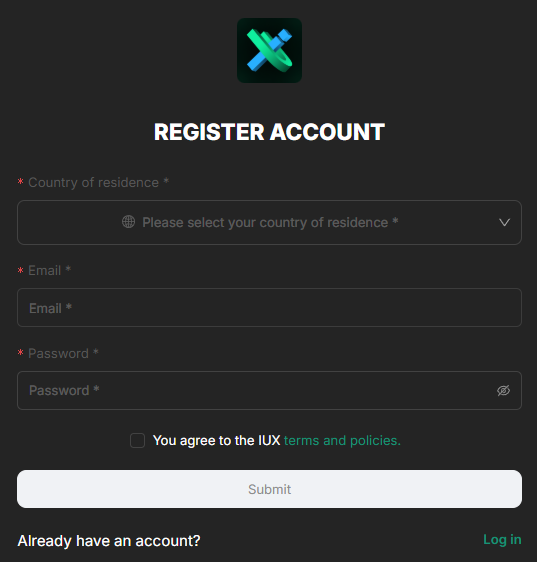
On the registration page, you’ll be prompted to enter basic personal information. This includes:
- Country of Residence: Select your country from the dropdown menu. This information is vital for regulatory compliance and to tailor services according to your region’s laws.
- Email Address: Input a valid and frequently used email address. This will be used for account verification and future communications.
- Password Creation: Choose a strong password combining letters (both uppercase and lowercase), numbers, and special characters. This enhances the security of your account.
Ensure that all the information provided is accurate to avoid any issues during the verification process. After filling in the details, review and accept the terms and conditions by checking the appropriate box. It is advisable to read through the terms to fully understand your rights and obligations.
Step 3: Email Verification
Upon submitting your information, IUX will send a verification email to the address provided. Access your email inbox, find the message from IUX, and click on the verification link contained within. This step confirms the validity of your email address and activates your account.
If you do not receive the email within a few minutes, check your spam or junk folders. Should the email still be absent, consider reaching out to IUX’s customer support for assistance.
Step 4: Logging into Your Account
With your email verified, return to the IUX website and log in using your credentials. You will be directed to your personal dashboard, the central hub where you can manage your account settings, access trading platforms, and monitor your portfolio.
Step 5: Choosing Between a Demo or Real Account
IUX offers the flexibility to choose between a demo account and a real trading account:
- Demo Account: Ideal for beginners or those wishing to test the platform without financial risk. It allows you to practice trading with virtual funds, providing a simulated market environment.
- Real Account: For traders ready to engage in live markets with actual capital. This option requires a verification process to comply with regulatory standards.
Decide which account type suits your current needs. If you are new to trading, starting with a demo account can be beneficial to gain familiarity with the platform and develop your trading strategies without the pressure of real financial loss.
Opening a Demo Account
To set up a demo account, navigate to the account section within your dashboard. Here, you will find options for different account types, such as “Standard” or “Standard+.” Select the “Try Demo” option associated with your preferred account type.
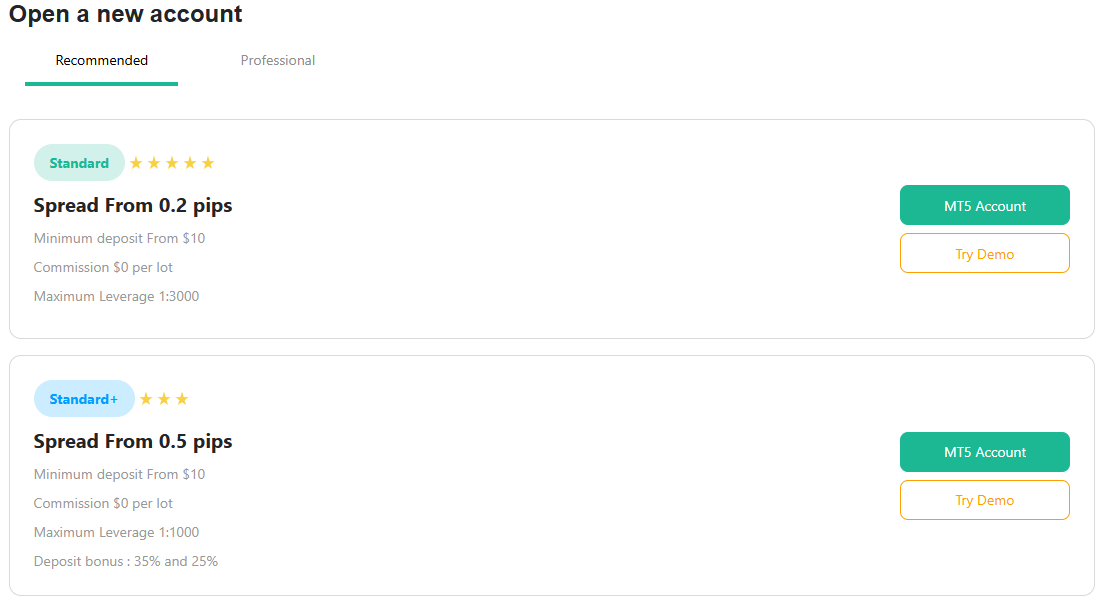
You will then be prompted to configure your demo account settings:
- Leverage Selection: Choose your desired leverage ratio. Leverage can amplify both profits and losses, so it’s crucial to understand its implications even in a simulated environment.
- Virtual Deposit Amount: Specify the amount of virtual money you wish to start with. This helps in setting a realistic trading scenario aligned with the capital you might invest in a real account.
Once these settings are configured, confirm your choices. Your demo account will be set up immediately, allowing you to access the trading platform and begin practicing.
Opening a Real Account
For those ready to trade with real funds, opening a live account involves a few additional steps to meet compliance requirements and ensure the security of all parties involved.
Verification Process
IUX adheres to international financial regulations, including Anti-Money Laundering (AML) and Know Your Customer (KYC) policies. The verification process is essential to fulfill these obligations.
- Upload Identification Documents
Provide a clear, color copy of a government-issued identification document. Acceptable forms include Passport, National Identity Card, Driver’s License
Ensure that the document is valid, not expired, and that all details are legible. The copy should include your full name, date of birth, photograph, and signature where applicable.
- Provide Proof of Residential Address
Submit a document that confirms your residential address. Acceptable documents include utility bills (electricity, water, gas, internet) dated within the last three months or Bank or Credit Card Statements showing your name and address. The document must display your full name and address exactly as provided during registration. It should be recent to ensure the information is up-to-date.
- Compliance Review
After uploading the necessary documents, IUX’s compliance team will review your submission. This process typically takes a few business days. They may contact you if additional information is required or if there are any discrepancies.
Upon successful verification, you will receive a confirmation email. Your account status will also be updated within the dashboard, granting you full access to all trading features.
Step 6: Funding Your Account
With your account verified, you can proceed to fund your trading account. IUX offers various deposit methods to accommodate different preferences:
- Credit/Debit Cards
- Electronic Wallets Skrill and Neteller)
- Cryptocurrency options, if available in your region
Navigate to the “Deposit Funds” section in your dashboard, select your preferred payment method, and follow the on-screen instructions. Be mindful of any minimum deposit requirements and fees associated with each method.
Step 7: Starting to Trade
After funding your account, you are ready to start trading. Access the trading platform through your dashboard. IUX provides a feature-rich platform with advanced charting tools, real-time market data, and a variety of order types to suit different trading strategies.
Before placing your first trade, consider the following:
- Market Research: Stay informed about market conditions and economic events that may impact your trades.
- Risk Management: Utilize stop-loss orders and set realistic profit targets to manage your exposure.
- Education: Take advantage of any educational resources offered by IUX, such as tutorials, webinars, or articles to enhance your trading knowledge.
Importance of Account Verification
The verification process, while sometimes seen as an inconvenience, plays a critical role in the security and integrity of the trading environment. It ensures compliance with global financial regulations designed to prevent fraudulent activities, money laundering, and financing of illegal operations.
For traders, verification provides peace of mind, knowing that the platform maintains high standards of security and that all users are authenticated. It also ensures that transactions, both deposits and withdrawals, are processed smoothly and securely.
Customer Support and Assistance
Should you encounter any issues during registration or trading, IUX offers customer support services to assist you:
- Live Chat: For immediate assistance, accessible directly from the website or trading platform.
- Email Support: For detailed inquiries or issues that require documentation.
- Phone Support: Speak directly with a customer service representative for personalized assistance.
- FAQ and Help Center: Access a repository of frequently asked questions and guides that may provide quick solutions to common problems.
Final Thoughts
Registering a trading account with IUX is designed to be a seamless process, balancing ease of access with necessary security measures. By following the steps outlined in this guide, you can establish your account confidently and begin exploring the opportunities available in the financial markets.
Remember that trading involves risks, and it is essential to trade responsibly. Utilize the demo account to hone your skills, develop a solid trading plan, and never invest more than you can afford to lose. Continuous learning and adherence to sound risk management principles are key to long-term success in trading.


